Best AI for YouTube Script Writing: 6 Tools Compared
A practical comparison for creators who want a stronger first draft without handing their channel voice over to a template.


Searching for the best AI for YouTube script writing usually sounds like a software question, but the useful answer depends on the video you are trying to make. A tutorial needs clear steps. A commentary video needs a point of view. A product review needs evidence and a fair comparison. A Shorts draft needs a fast promise and a visible payoff. The same generator can feel excellent in one of those jobs and frustrating in another.
This guide compares six practical options by workflow rather than by a vague claim that one tool is best for everyone. It also separates script writing from transcription and script-to-video generation. If you need to turn an existing video into text, search for a transcript tool; if you need finished visuals, look for a video-generation workflow. This page focuses on turning an idea, outline, or rough brief into a recordable YouTube script.
Short answer
For a fast, free first draft, ScriptGenerator.org is a sensible starting point. For flexible brainstorming, a general assistant may be better. For channel-specific ideation, a YouTube-focused product can add useful context. The winning choice is the one that matches your editing stage, not the one with the longest feature list.
If you already know your topic and audience, test the same brief in two tools, compare the first 30 seconds, and keep the version with the clearest promise. Try the YouTube Script Generator
How to Choose an AI for YouTube Scripts
Before comparing brands, decide what a useful draft must do for you. These six checks keep the comparison tied to the work a creator actually has to finish.
Brief control
Can you specify the audience, video promise, tone, length, format, and call to action without fighting the interface? A controlled brief is the easiest way to avoid generic openings.
Hook quality
The first lines should make a specific viewer understand why the video is worth watching. A dramatic sentence is not automatically a useful hook if it does not match the evidence you can deliver.
Structure
Look for a clear sequence of hook, context, beats, proof, payoff, and next step. A script is easier to record when every section has a job.
Voice and editing
The draft should be easy to shorten, rewrite, and make personal. Long paragraphs and repeated adjectives create more cleanup than value.
YouTube fit
A good tool should let you think about viewer expectation, pacing, title promise, retention moments, and the difference between spoken words and visuals.
Trust and limits
Check how the tool handles facts, citations, sensitive claims, and usage limits. Treat generated details as unverified until you review them yourself.
Best AI Tools for YouTube Script Writing
The table is a starting map, not a permanent ranking. Product limits, pricing, models, and interfaces change, so verify the current plan and output behavior before committing to a long workflow.
| Tool | Best for | Strength | Tradeoff | Official page |
|---|---|---|---|---|
| ScriptGenerator.org | Fast free drafts | Simple topic-to-script flow with hooks, structure, and CTAs | You still need to add channel-specific examples and fact checks | YouTube Script Generator |
| ChatGPT | Angles and rewrites | Flexible back-and-forth brainstorming and format changes | Quality depends heavily on your brief and editing discipline | ChatGPT |
| Claude | Long outlines and revisions | Useful when you need to compare a draft, notes, and a style guide | A long response can still sound smooth but generic without concrete examples | Claude |
| vidIQ | YouTube topic and idea workflows | A channel-focused environment can help connect ideas to YouTube decisions | The useful workflow may depend on the current plan and available account features | vidIQ AI Script Generator |
| InVideo AI | Script-to-video workflows | Helpful when the script is one step inside a larger video production process | A creator who only needs writing may find the wider workflow distracting | InVideo AI |
| Kapwing | Lightweight editing teams | Useful for creators who move between script, captions, and simple editing | Do not confuse an editing workflow with a guarantee of better ideas | Kapwing AI Script Generator |
No tool can replace channel knowledge. The person who knows the audience, proof, examples, and editorial boundaries should remain responsible for the final script.
Which Tool Fits Your Creator Workflow?
Start with the job you need to complete this week. You can switch tools later; you cannot recover a viewer's trust after publishing a script that makes unsupported claims.
| Scenario | Priority | Recommended starting point | Check before recording |
|---|---|---|---|
| Tutorial or how-to | Order, clarity, and missing steps | ScriptGenerator.org or a general assistant | Does every step include what the viewer sees and does? |
| Commentary or essay | Point of view and evidence | Claude or ChatGPT for outline iterations | Which lines are your analysis rather than generic filler? |
| Product review | Fair criteria and proof | Any tool with a strict comparison brief | Are prices, specifications, and claims current and sourced? |
| Shorts or fast tips | One promise and a quick payoff | YouTube Script Generator plus the Shorts template | Can the viewer understand the point in the opening seconds? |
| Script-to-video production | Scenes, voiceover, and edit handoff | InVideo or an editor-connected workflow | Does the visual plan support the spoken line instead of repeating it? |
A Better Brief for an AI YouTube Script
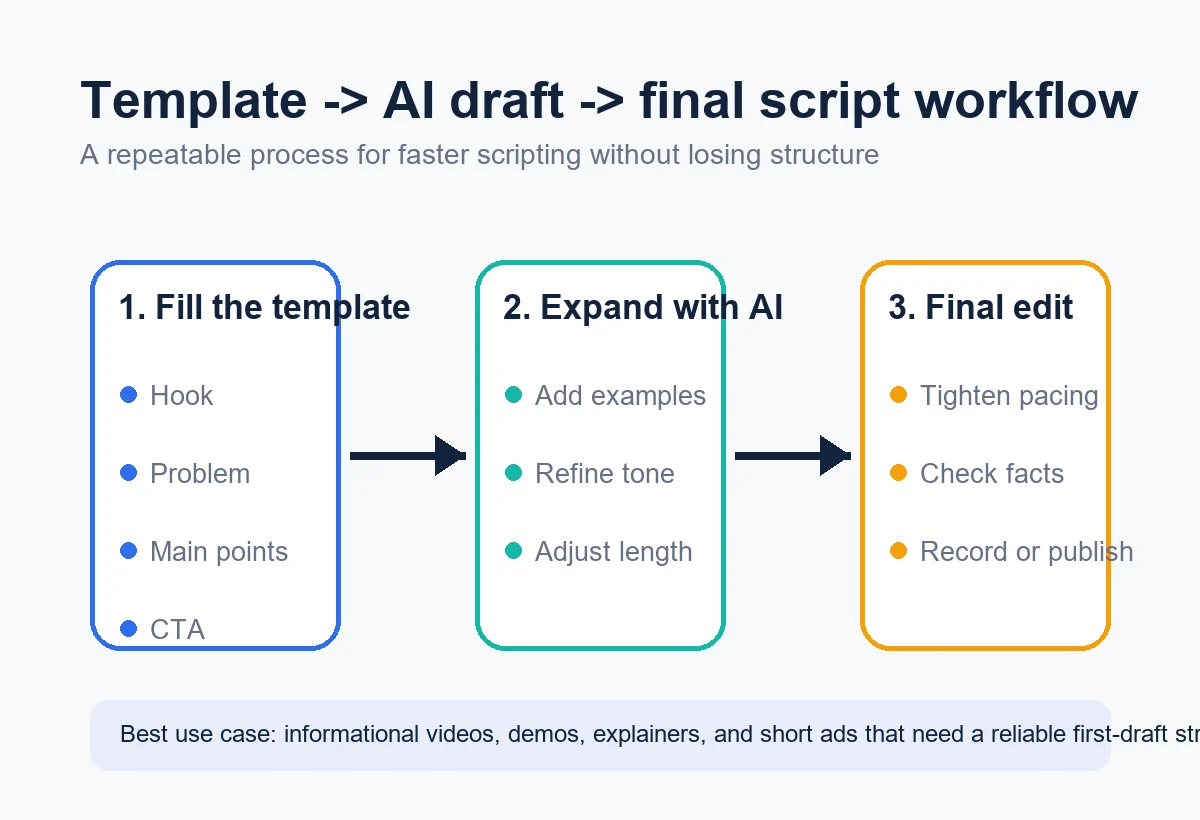
The phrase “write a YouTube script about X” is too open-ended. Give the model the decisions that make your channel different, then ask for a draft that is easy to challenge.
- Name the viewer. Describe who is watching, what they already know, and what would make them leave.
- State one promise. Write the result in one sentence. Do not combine a tutorial, review, story, and news update in the same promise.
- Set the format. Choose a long-form video, Short, explainer, interview intro, review, or list, plus an approximate duration.
- Request visual beats. Ask what appears on screen, where an example starts, and when the viewer should see proof.
- Add voice rules. Specify whether the delivery should be calm, direct, playful, skeptical, or instructional, and ban phrases you would never say.
- Require uncertainty. Tell the tool to mark assumptions and leave placeholders for facts you will verify instead of inventing confidence.
Example brief
Write a 6-minute YouTube tutorial for first-time creators who want to plan a product review. Start with the most common planning mistake, promise a three-part checklist, include one visual example per part, keep the voice practical rather than hype-driven, and mark every product fact that needs verification. End with one clear next step, not a list of five CTAs.
What to Check Before You Record
AI is useful at producing options, but the final pass belongs to the creator. Read the script aloud and make the viewer's experience visible in the text.
- The promise is honest. The opening does not promise a result that the video cannot demonstrate.
- The first minute earns its place. Context is short, specific, and connected to the viewer's reason for clicking.
- The visuals add information. B-roll, screen captures, examples, and pauses do more than repeat the narration.
- Claims have owners. You know which details come from your experience, which need a source, and which are still assumptions.
- The CTA is singular. The ending asks for one relevant next action that fits the video's promise.
Best AI for YouTube Script Writing FAQ
Choose the Tool That Helps You Make the Next Decision
The best AI for YouTube script writing is not the tool that makes the most confident paragraph. It is the tool that helps you move from a clear audience promise to a script you can record, edit, and defend. Start with a small test: one topic, one audience, one duration, and one CTA.
Then compare the opening, structure, visual instructions, and amount of cleanup. Keep the useful parts, rewrite the rest in your own voice, and treat every factual detail as something to verify. That workflow will stay valuable even as AI products and plans change.
Related resources
Useful official pages
- Use YouTube's official help center to verify current platform guidance before publishing claims about formats or features. YouTube Help
- Official product page checked as one example of a YouTube-focused writing workflow. vidIQ AI Script Generator
- Official product page checked as an example of a script-to-video workflow. InVideo AI Script Generator
- Official product page checked as an example of a lightweight editing workflow. Kapwing AI Script Generator
Last updated: August 7, 2026